A modern customer portal should do more than display information. It should help customers access accurate account details, track orders, manage invoices, submit requests, and communicate with a business without switching between multiple systems.
However, delivering this experience becomes difficult when customer information is scattered across a Customer Relationship Management (CRM) platform, an Enterprise Resource Planning (ERP) system, billing software, inventory databases, and support applications.
This is where customer portal integration becomes essential. By connecting a customer-facing portal with existing business systems, organizations can create a unified digital experience while reducing manual work, duplicate data entry, and communication gaps.
Whether you’re building a B2B customer portal, an e-commerce account dashboard, or a self-service platform for clients, successful integration depends on choosing the right architecture, defining how data moves between systems, and implementing strong security controls.
In this guide, we’ll explain how customer portal integration works, which systems businesses commonly connect, the architecture and technologies involved, practical use cases, implementation steps, costs, and best practices.
What Is Customer Portal Integration?
Customer portal integration is the process of connecting a customer-facing web application with the software systems a business already uses to manage customer relationships, orders, payments, inventory, support, and operations.
Instead of storing separate copies of business information in the portal, integrations allow it to retrieve or exchange data with authorized backend systems.
For example, a customer signing into a manufacturing company’s portal might be able to view negotiated pricing, check order status, download invoices, review shipment details, and submit a support request. Those features may rely on information from several different applications working together.
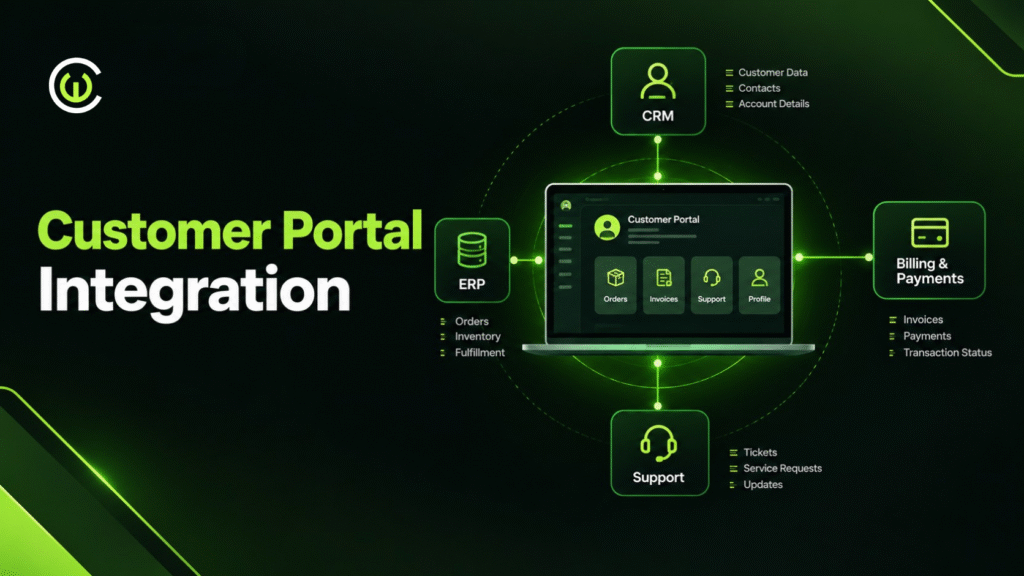
A CRM could provide customer and contact information, an ERP could supply order and inventory records, a payment system could handle transactions, and a support platform could manage service tickets.
The portal provides one consistent interface through which customers can access the information and functions they are permitted to use.
Customer Portal vs. Customer Portal Integration
A customer portal is the digital interface customers use to interact with a business. Customer portal integration connects that interface to the systems responsible for the underlying information and processes.
A portal without sufficient integration might show static information or require employees to update records manually. An integrated portal can retrieve current information, submit requests to authorized systems, and reflect approved changes across the relevant workflow.
The goal is not to connect every application simply because an integration is possible. It is to connect the systems needed to deliver a useful, secure, and consistent customer experience.
Why Does Customer Portal Integration Matter?
Customers increasingly expect digital services to be convenient, responsive, and available without unnecessary manual intervention. Businesses also need to manage growing volumes of information without creating more disconnected workflows.
Integration helps address both challenges.
A Consistent Customer Experience
When the portal connects to the systems that manage customer accounts, orders, and support, customers can access relevant information from one place.
For example, a customer checking a shipment should not have to contact sales to confirm an order and then contact logistics to obtain tracking information. An integrated portal can bring these details together when the underlying systems make them available.
Less Manual Work for Employees
Without integration, employees may need to copy order details, update customer records, reconcile invoices, or respond to routine status inquiries manually.
Connecting the portal to the appropriate systems reduces repeated data entry and can automate parts of these workflows. Employees can then focus on exceptions, complex requests, and customer relationships.
More Reliable Business Information
Disconnected applications often develop conflicting versions of the same customer or transaction record.
An integration architecture can define which system owns each type of information and how updates are synchronized. This reduces inconsistencies and makes it easier to trace where a value originated.
Integration does not automatically guarantee accurate data, however. Businesses still need validation rules, reconciliation processes, and clear ownership of records.
Better Visibility Across Business Operations
An integrated portal can provide customers and employees with a clearer view of orders, invoices, delivery progress, and support requests.
This visibility helps customers understand what is happening and gives internal teams better context when responding to questions.
Which Business Systems Should You Integrate With a Customer Portal?
The systems you connect should reflect the portal’s intended purpose. A B2B ordering portal will have different requirements from a customer service portal or a subscription management platform.
CRM Integration
A CRM system manages customer relationships, contacts, sales activities, and related customer information.
Connecting a portal to a CRM can enable customers to update approved profile details, view relevant account information, submit inquiries, and track interactions where appropriate.
For example, a business customer might submit a request through the portal. The integration can create a corresponding CRM record, associate it with the correct account, and make the request visible to the responsible sales or service team.
The portal should only expose CRM information that the authenticated customer is authorized to access.
ERP Integration
An ERP system typically manages operational processes such as orders, inventory, procurement, finance, and fulfillment.
ERP integration is especially important for B2B portals, distributors, manufacturers, and companies that manage complex order workflows.
Depending on the ERP’s capabilities, a portal might display order history, product availability, delivery status, approved pricing, and invoice details. Customers may also be able to submit purchase orders or request changes through controlled workflows.
Because ERP records often support financial and operational processes, the integration must handle validation, transaction status, and failures carefully.
Payment and Billing Integration
Payment and billing integrations allow customers to view outstanding invoices, review transaction history, access receipts, and make payments through an approved payment provider.
For example, a subscription customer could sign in, view an unpaid invoice, complete a payment through the provider’s hosted checkout, and return to the portal to see the updated status.
Payment status should be confirmed by the trusted backend or payment provider rather than inferred solely from a browser redirect. Sensitive payment information should be handled according to applicable security requirements.
Inventory and Order Management Integration
For e-commerce, wholesale, and distribution portals, inventory and order management systems provide essential operational information.
A portal can use these integrations to display product availability, submit orders, provide fulfillment updates, and show tracking details.
The system should account for inventory changes, concurrent orders, and delayed updates. A stock quantity displayed moments ago may no longer be available when the customer submits an order, so the backend must validate availability before confirming the transaction.
Customer Support and Ticketing Integration
Connecting a portal to a support platform lets customers create tickets, upload relevant documents, review permitted ticket updates, and communicate with support teams.
It can also reduce repetitive questions by making previous requests and their current status accessible.
For example, a customer reporting a defective product might submit the order reference, describe the issue, and attach evidence. The integration creates a support ticket linked to the appropriate customer and order records.
Identity and Access Management Integration
Identity integration manages how customers register, sign in, recover access, and authenticate to the portal.
Depending on the requirements, a portal might support single sign-on, multi-factor authentication, enterprise identity providers, or federated login.
For B2B portals, access management may also need to distinguish between individual users, customer organizations, departments, and account-level permissions. One customer’s employees should not automatically gain access to every record belonging to that company.
Customer Portal Integration Architecture
A reliable architecture separates the customer interface from backend systems and provides a controlled way to access their capabilities.
Microsoft’s enterprise integration architecture guidance describes patterns that use API management and workflow services to connect applications while controlling access to backend systems.
A typical customer portal architecture includes the following components.
1. Customer Portal Frontend
The frontend is the website or web application customers interact with.
It may include account dashboards, order history, invoices, product catalogs, support requests, and profile management. The frontend should present information clearly, handle loading and error states, and work across supported devices.
The frontend should not contain privileged credentials or directly access internal databases.
2. Backend Application and Business Logic
The backend handles requests from the frontend, checks business rules, validates inputs, and coordinates access to other systems.
For example, when a customer requests an invoice, the backend verifies the user’s access to the relevant account and invoice before retrieving the information.
Keeping business logic on the server helps prevent users from bypassing rules by manipulating browser requests.
3. API Gateway and Integration Layer
An API gateway provides a controlled entry point for API requests. Depending on the architecture, it may enforce authentication, apply rate limits, route requests, and provide monitoring.
The integration layer connects the portal backend to CRM, ERP, billing, inventory, and other applications. It can transform data formats, coordinate workflows, and isolate the frontend from differences between backend systems.
For larger environments, an integration platform or workflow service may be useful. Simpler projects may only require a small number of well-designed APIs.
4. Business Systems and Data Sources
These are the applications that own the underlying business records.
The CRM may be authoritative for sales contacts, while the ERP owns order records and a payment provider owns payment transaction status. Defining these responsibilities prevents the portal from becoming an unplanned second system of record.
5. Event Processing and Background Jobs
Not every operation should happen during a customer’s request.
Long-running tasks, such as generating a large report, processing a bulk order, or synchronizing records, may be better handled through background jobs, message queues, or event-driven workflows.
These mechanisms help separate the customer experience from slower backend processing and can improve resilience.
6. Monitoring, Security, and Audit Logging
The architecture should record important events, integration failures, and administrative actions. Monitoring helps teams detect unavailable APIs, slow responses, repeated failures, and unexpected changes in system behavior.
Logs should support investigation without unnecessarily storing passwords, payment details, access tokens, or other sensitive information.
Example Architecture Flow
A simplified architecture may look like this:
Customer Browser → Portal Frontend → Secure Backend/API Layer → Integration Services → CRM, ERP, Billing and Support Systems
Background processing and event notifications can operate alongside this request path. The exact design depends on whether the portal needs immediate responses, asynchronous processing, or a mixture of both.
How Does Customer Portal Integration Work?
The integration process typically involves a request from the portal, authorization checks, communication with a backend system, and a response that the portal can present to the customer.
Consider a customer checking the status of an order.
- The customer signs in and opens the order details page.
- The portal sends a request to its backend for a specific order.
- The backend verifies the user’s identity and checks whether the user is authorized to access that order.
- The integration layer retrieves the required information from the system responsible for order status.
- The backend validates and formats the response.
- The portal displays the status and any available delivery details.
If the ERP or order service is unavailable, the portal should handle the failure gracefully rather than displaying misleading information.
For example, it might show the last successfully updated status with a clear timestamp, if that behavior is appropriate, or explain that current information is temporarily unavailable.
The same principle applies to payments, profile changes, support requests, and other customer actions: validate permissions, process the request through the appropriate system, and communicate the outcome accurately.
Common Integration Methods and Technologies
There is no single integration technology that fits every customer portal. The right choice depends on the systems involved, how quickly information must be updated, the available interfaces, and the business consequences of a failed operation.
REST APIs
REST APIs are widely used to let applications exchange information through HTTP-based requests and responses.
They are a common choice when a portal needs to retrieve customer details, request order information, submit support tickets, or interact with a backend service.
APIs should define clear data contracts, authentication requirements, error responses, and versioning rules. The integration should also respect the rate limits and operational constraints of the systems it connects to.
Webhooks and Event-Driven Integration
Webhooks and event-driven architectures allow systems to notify other applications when relevant events occur.
For example, an order system might publish an event when an order ships, allowing a connected service to update the portal’s status or send a notification.
Event-driven integration can reduce the need for constant polling. However, events may arrive late, be duplicated, or be processed out of order. Consumers should be designed to handle these possibilities safely.
Middleware and Integration Platforms
Middleware helps connect applications with different interfaces, data formats, and workflow requirements.
An integration platform can provide connectors, transformation logic, workflow orchestration, monitoring, and reusable integration components.
This approach can be useful when a portal needs to communicate with many systems or when integration logic is shared across several applications.
Microsoft’s Azure integration architecture guidance describes how APIs, workflow services, messaging, and event-based technologies can be combined for different integration scenarios.
Message Queues
Message queues allow systems to exchange work without requiring every operation to finish during the original customer request.
For example, a customer may submit a large order that requires multiple validation steps. The portal can confirm that the request was received, while background services process it and update the order status when the result is available.
This approach is useful for longer workflows, but the portal must clearly distinguish between a request being received, accepted, processed, and completed.
Direct Database Integration
Direct database connections may appear convenient when an existing application has no usable API. However, connecting a new portal directly to another system’s production database can create tight coupling, bypass business rules, and expose sensitive data.
Where possible, use supported APIs, vendor-approved connectors, or a controlled integration service. If database-level integration is unavoidable, limit permissions and establish a clear plan for schema changes, transactions, monitoring, and recovery.
Practical Customer Portal Integration Examples
Example 1: B2B Ordering Portal for a Manufacturer
Imagine a manufacturer that receives orders from distributors through email and spreadsheets. Sales employees manually enter orders into the ERP, check stock, and respond to delivery inquiries.
An integrated B2B portal could let authorized distributors sign in, view approved products and pricing, create purchase orders, and track order progress.
The CRM provides account and relationship information, the ERP manages orders and inventory, and the shipping service supplies available tracking details.
The result is a more structured ordering process with fewer repetitive status inquiries. The manufacturer still needs backend validation for customer-specific pricing, credit limits, inventory, and order acceptance.
Example 2: Customer Portal for a SaaS Company
A SaaS business might want customers to manage subscription details, view invoices, update authorized account information, and submit support requests.
The portal can connect to the subscription management platform, payment provider, CRM, and support system.
When a customer changes a subscription, the backend validates the requested change and processes it through the system that owns subscription state. The portal then displays the confirmed result.
This helps customers manage routine tasks independently while giving support employees better visibility into the account.
Example 3: Service Business Portal
A maintenance company might use a portal to let business customers schedule service visits, review previous work, download invoices, and monitor open service requests.
The portal could integrate with a scheduling system, CRM, billing software, and field-service platform.
A customer could submit a maintenance request, receive a reference number, and later view the confirmed appointment and service status without repeatedly contacting the office.
The integration must account for scheduling conflicts, changes in technician availability, and cancellations so that customers see accurate information.
Security Best Practices for Customer Portal Integration
Customer portals often expose sensitive business and personal information. Integration security must therefore be considered throughout the design, implementation, and maintenance process.
Strong Authentication and Authorization
Require appropriate authentication and verify access rights for every protected operation.
For B2B portals, authorization should account for both the individual user and the organization or account they belong to. A user who can view one order should not automatically be allowed to retrieve another customer’s order by changing an identifier in the request.
Protect APIs and Backend Systems
Use secure transport, appropriate authentication, rate limiting, input validation, and carefully scoped service credentials.
Do not expose internal services unnecessarily. An API gateway or backend service can provide a controlled interface between the customer portal and internal applications.
For additional guidance, review the OWASP API Security Top 10, which covers common risks such as broken object-level authorization, authentication failures, and unrestricted resource consumption.
Minimize Data Exposure
Only return information required for the customer’s task. Avoid sending unnecessary internal notes, employee-only fields, confidential pricing data, or sensitive identifiers to the browser.
Sensitive fields should be filtered and authorized on the server, not merely hidden in the frontend.
Secure Credentials and Secrets
Store API credentials, signing keys, and service secrets in appropriate secret-management systems. Avoid embedding privileged secrets in client-side code, source repositories, or publicly accessible configuration files.
Rotate credentials when required and monitor their use.
Log Important Actions
Record security-relevant activities such as account changes, permission updates, sensitive downloads, and important transaction events.
Logs should help investigators understand who performed an action, when it occurred, and which system processed it. They should also be protected against unauthorized access and excessive retention.
Plan for Failures and Recovery
Define how the portal behaves when an integration is unavailable or returns an unexpected response.
Use timeouts, controlled retries, idempotency for operations that may be repeated, and reconciliation processes for transactions whose outcomes are uncertain. Avoid retrying sensitive operations blindly, as that can create duplicate orders or payments.
Common Customer Portal Integration Challenges
Legacy Systems With Limited API Support
Older systems may lack modern APIs, documentation, or reliable event notifications.
Businesses may need an adapter, middleware service, vendor connector, or carefully controlled data exchange process. The preferred approach should minimize disruption to the existing system while keeping the new portal maintainable.
Inconsistent Data Across Applications
Different systems may use different customer identifiers, address formats, product codes, or definitions of account status.
A data mapping strategy should define how these values correspond and which system is authoritative for each field. Validation and reconciliation help detect inconsistencies before they affect customers.
Real-Time Updates and Data Synchronization
Not every system can provide instant updates. Some integrations rely on scheduled synchronization, while others support events or direct requests.
Choose the freshness requirement for each data type. Payment confirmation and available inventory may require stricter validation than a historical report that updates periodically.
Poor API Performance
A portal page that depends on several slow backend requests can become frustrating to use.
Reduce unnecessary calls, apply suitable caching to non-sensitive and appropriately scoped data, use pagination for large datasets, and move long-running operations into background workflows when practical.
Growing Integration Complexity
As the number of connected applications increases, the number of dependencies and failure points can grow too.
Use documented interfaces, reusable integration components, consistent error handling, and monitoring. Avoid creating undocumented point-to-point connections that only one developer understands.
Step-by-Step Guide to Implementing Customer Portal Integration
A structured implementation process helps prevent integration problems from surfacing only after launch.
Step 1: Identify Customer Needs and Business Goals
Start by defining what customers should be able to do through the portal.
The requirements might include viewing orders, downloading invoices, submitting support requests, making payments, or managing account users. Prioritize features based on customer value, business impact, and implementation complexity.
Step 2: Audit Existing Business Systems
Document the applications that own the information required by the portal.
For each system, identify available APIs, data structures, authentication methods, rate limits, licensing restrictions, and integration documentation. Determine whether the vendor supports the intended integration and whether additional access or configuration is required.
Step 3: Define Data Ownership
Decide which system is authoritative for each record or field.
For example, the CRM might own contact information, the ERP might own order status, and the payment provider might own transaction confirmation. Define how updates are handled when multiple systems contain related information.
This step is important because integration should not create competing sources of truth.
Step 4: Design the Integration Architecture
Choose how the portal communicates with the backend systems.
Define the responsibilities of the frontend, application backend, API gateway, integration services, and background processing components. Determine which requests need immediate responses and which can be processed asynchronously.
The architecture should support the expected workload while remaining understandable and maintainable.
Step 5: Establish Security Requirements
Design authentication, authorization, tenant isolation, data validation, credential management, and audit logging before building the integrations.
Map sensitive actions to the permissions required to perform them. Establish approval or verification steps for transactions and administrative changes where necessary.
Step 6: Build a Small End-to-End Integration
Start with one high-value workflow, such as displaying order history or creating a support ticket.
Test the entire journey from customer authentication through backend authorization, data retrieval, error handling, and frontend presentation.
A small working integration helps reveal issues with data mapping, API limits, and system behavior before the architecture expands.
Step 7: Test Normal and Failure Scenarios
Test more than the successful path. Include expired sessions, unauthorized account access, unavailable services, malformed data, duplicate requests, timeouts, and partial failures.
Check that the portal displays accurate status information and does not leak sensitive details when something goes wrong.
Step 8: Launch in Phases
Begin with a pilot group or a limited set of portal features. Monitor performance, support requests, integration errors, and customer feedback.
Expand gradually once the system meets the agreed security, reliability, and usability requirements.
Step 9: Monitor and Maintain the Integrations
Track response times, error rates, synchronization delays, failed transactions, and API usage. Review logs and alerts regularly, and update integrations when upstream systems change.
A customer portal is an ongoing product, so maintenance, security patches, API version updates, and user feedback should be included in the operating plan.
How Much Does Customer Portal Integration Cost?
The cost of customer portal integration depends on the number of connected systems, the condition of existing software, the complexity of business workflows, the level of security required, and the scope of the customer-facing application.
A portal that retrieves basic CRM information through a well-documented API is usually less complex than a B2B platform that synchronizes orders, inventory, customer-specific pricing, payments, and fulfillment across several legacy systems.
The following figures are illustrative planning estimates, not verified market averages or quotes. Actual costs can vary substantially by region, provider, platform licensing, and project requirements.
| Project scope | Illustrative development budget |
|---|---|
| Basic portal with one or two straightforward integrations | $5,000–$15,000 |
| Mid-sized portal with multiple systems and business workflows | $15,000–$50,000 |
| Complex enterprise portal with legacy systems, advanced permissions, and extensive integrations | $50,000–$150,000+ |
Factors That Influence the Budget
Number and complexity of integrations: Each system may require different authentication, data mapping, validation, and error handling.
Existing API availability: Well-documented APIs can reduce development effort. Legacy systems may require additional middleware or custom adapters.
User roles and permissions: Multi-organization portals, delegated administration, and granular access controls increase design and testing requirements.
Workflow complexity: Features such as order approvals, subscription changes, returns, payments, and multi-step service requests require additional business logic.
Security and compliance: Auditability, data retention, privacy obligations, and industry-specific requirements can affect both implementation and maintenance.
Ongoing operating costs: Hosting, monitoring, API subscriptions, vendor licensing, support, and future upgrades should be included in the total cost of ownership.
For a more reliable estimate, define the portal’s essential features, list the systems it must connect to, document security requirements, and validate the most uncertain integration through a proof of concept.
How to Measure Customer Portal Integration Success
An integration should be evaluated by how well it improves the customer experience and business operations, not simply by the number of connected applications.
Useful metrics include:
| Metric | What it tells you |
|---|---|
| Portal adoption rate | Whether customers are using the portal |
| Self-service completion rate | How often customers finish tasks without employee assistance |
| Support request volume | Whether routine inquiries are decreasing |
| Integration error rate | How frequently system-to-system operations fail |
| Data freshness | How current the information shown to customers is |
| Page and API response time | How quickly customers can complete common actions |
| Transaction success rate | Whether important actions, such as order submissions, complete correctly |
| Customer satisfaction | How customers perceive the portal experience |
| Maintenance cost | How much effort is required to keep integrations reliable |
Establish baseline values before launch and compare results over time. For example, a reduction in routine order-status inquiries may indicate value, but it should be considered alongside portal adoption, customer satisfaction, and the accuracy of displayed order information.
Frequently Asked Questions About Customer Portal Integration
What is customer portal integration?
Customer portal integration connects a customer-facing website or application with backend systems such as CRM, ERP, billing, inventory, and support platforms. It allows authorized customers to access business information and complete supported tasks through one interface.
Why should a customer portal integrate with a CRM and ERP?
CRM integration can provide customer and relationship information, while ERP integration can support operational workflows such as orders, inventory, and invoices. Connecting both can create a more consistent customer experience and reduce manual work, provided that data ownership and permissions are clearly defined.
Which technologies are used for customer portal integration?
Common technologies include REST APIs, webhooks, message queues, event-driven processing, middleware, integration platforms, and API gateways. The right combination depends on the existing systems, data freshness requirements, workflow complexity, and reliability needs.
Is customer portal integration secure?
It can be designed securely with strong authentication, server-side authorization, least-privilege access, encrypted communication, input validation, and audit logging. Security also depends on how each connected system is configured and maintained.
How long does customer portal integration take?
Timelines depend on scope, system complexity, and API availability. A small integration with a well-documented API may take considerably less time than a portal involving legacy applications, complex permissions, and multi-step business workflows. A discovery phase can provide a more realistic timeline.
Can a customer portal integrate with legacy software?
Yes, in many cases. Options include vendor-supported connectors, custom APIs, middleware, controlled data exchange, or adapters that expose legacy functionality through a modern interface. The choice depends on the system’s capabilities, support status, and security constraints.
Should a customer portal use real-time or scheduled synchronization?
Use real-time requests or events when customers need current information or when actions depend on immediate validation. Scheduled synchronization may be suitable for reports or information that does not need instant updates. Many portals use a combination of approaches.
Can customer portal integration reduce operating costs?
It can reduce repetitive data entry, routine support requests, and manual status updates. The actual savings depend on customer adoption, the quality of the integration, and the ongoing cost of operating and maintaining the system.
How do you choose a customer portal integration partner?
Look for experience with custom web applications, APIs, backend systems, security, and the specific platforms involved. A suitable partner should be able to explain the proposed architecture, data ownership, failure handling, testing strategy, and maintenance plan—not just the visual design.
Conclusion
Customer portal integration connects the customer experience with the business systems that manage accounts, orders, payments, inventory, and support. When implemented well, it helps customers complete tasks independently while giving businesses a more consistent and manageable way to deliver digital services.
The strongest implementations start with clear customer needs, define authoritative data sources, choose appropriate integration methods, and enforce security at every layer. They also account for unavailable services, delayed updates, duplicate requests, and the ongoing work required to maintain connected applications.
Rather than connecting every system at once, begin with a high-value workflow, validate the architecture, and expand based on measurable results.
A well-integrated customer portal is not simply another website. It is a practical connection between the services customers use and the business operations that make those services work.