AI is moving beyond individual chatbots and assistants. Businesses are now exploring systems where multiple AI agents collaborate, divide complex tasks, share information, and work toward a common goal. These systems are commonly known as AI agent swarms.
Instead of asking one AI agent to research a market, analyze competitors, evaluate costs, create a strategy, and review the final result, an agent swarm can assign these responsibilities to specialized agents. Each agent contributes its expertise, while the overall system coordinates their work.
This approach can help organizations tackle complex workflows in software development, business research, customer support, data analysis, and enterprise automation. However, adding more agents does not automatically make an AI system smarter, faster, or cheaper. The results depend on the architecture, communication rules, security controls, and quality of coordination.
In this guide, we’ll explore what AI agent swarms are, how they work, their architecture, real-world use cases, implementation steps, challenges, and best practices for building reliable multi-agent systems.
What Are AI Agent Swarms?
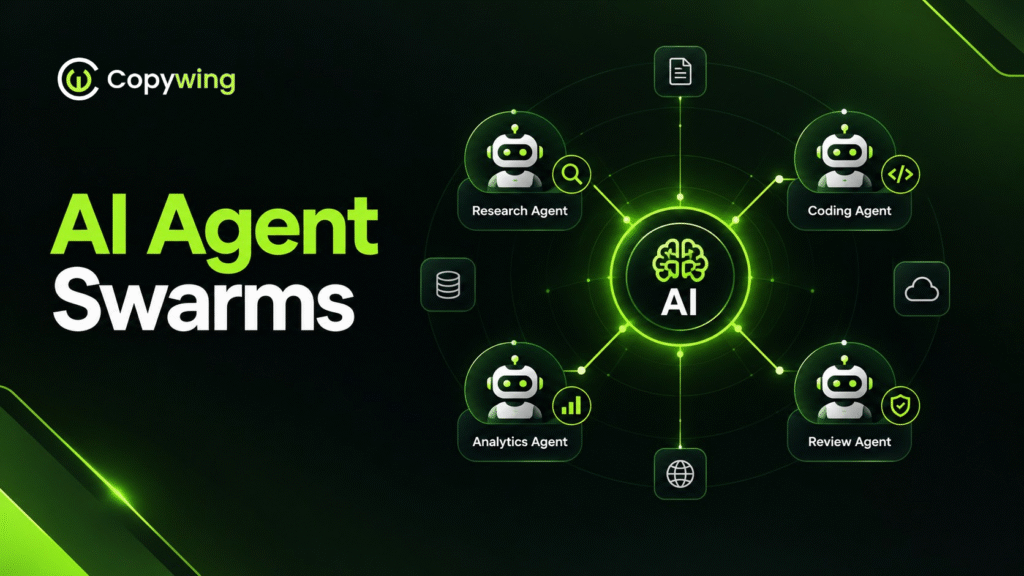
An AI agent swarm is a group of specialized AI agents that collaborate to accomplish a shared objective. Each agent may have its own instructions, tools, context, and responsibilities, allowing it to focus on a specific part of a larger problem.
For example, a business planning swarm might include a market research agent, a financial analysis agent, a strategy agent, and a review agent. Together, these agents can gather information, evaluate different options, and produce a more comprehensive business plan.
AI agent swarms are a type of multi-agent system. The term “swarm” generally emphasizes collaboration and interaction among agents rather than simply running several independent AI assistants.
According to IBM’s overview of AI agent swarms, coordination is a central part of how these systems operate. Agents need a way to divide work, exchange findings, and combine their contributions into a useful result.
How Are AI Agent Swarms Different From Traditional AI Agents?
A traditional AI agent usually handles a task using its own reasoning capabilities, tools, and instructions. An agent swarm distributes a complex objective across multiple agents that can contribute different skills or perspectives.
Consider a company researching a new product opportunity.
A single AI agent might perform the research, estimate demand, analyze competitors, and prepare recommendations in one workflow. An agent swarm could assign market research, competitor analysis, financial modeling, and quality review to separate agents.
The second approach may be useful when these responsibilities require distinct expertise or can run in parallel. However, a well-designed single agent may still be the better choice for straightforward tasks.
How Do AI Agent Swarms Work?
AI agent swarms work by breaking a high-level objective into smaller tasks, assigning those tasks to suitable agents, exchanging relevant information, and combining the results.
The exact workflow depends on the architecture. Some systems use a central coordinator, while others allow agents to communicate more directly with one another.
Step 1: Receive the Objective
The process begins when a user or business application provides a goal.
For example, a company might ask its AI system to identify potential markets for a new software product.
The system needs to understand the requested outcome, available data, constraints, and expected deliverables before assigning work.
Step 2: Break the Work Into Tasks
The system identifies the individual activities required to complete the objective.
For market research, these might include:
- Analyzing customer demand
- Identifying competitors
- Reviewing industry trends
- Estimating market opportunities
- Evaluating potential risks
The system then determines which activities can be performed independently and which depend on earlier findings.
Step 3: Assign Specialized Agents
Each task is assigned to an agent with appropriate instructions, context, and tools.
A market research agent might analyze industry reports, while a competitor analysis agent reviews competing products and pricing. A financial agent could estimate commercial opportunities using the available evidence.
Clear responsibilities help reduce duplicated work and make individual agents easier to evaluate.
Step 4: Enable Communication and Collaboration
Agents share their findings through structured messages, shared state, task results, or other communication mechanisms.
For example, the financial analysis agent might use information gathered by the market research agent to estimate potential revenue. The strategy agent can then use both outputs to develop recommendations.
Not every agent needs access to every conversation or piece of data. Good systems share only the context required for each task.
Step 5: Review and Combine Results
The system combines the outputs into a final deliverable. Depending on the use case, a reviewer agent may check consistency, identify unsupported claims, or request additional analysis.
A final validation stage can also check whether the result meets the original requirements.
Step 6: Return the Result or Request Human Approval
Once the work passes the defined checks, the system returns its output or performs an approved action.
For sensitive activities—such as sending external communications, changing customer records, or approving financial transactions—a human approval step may be necessary.
AI Agent Swarm Architecture
A reliable AI agent swarm requires more than multiple language models. It needs a clear architecture that defines task distribution, agent communication, shared context, tool access, monitoring, and failure handling.
A typical implementation may include the following components.
1. User Interface and Application Layer
This is where users or other applications submit requests and receive results.
The interface could be a web application, an internal business dashboard, a customer portal, or an API connected to an existing workflow.
2. Task Planning and Coordination Layer
The coordination layer interprets the objective and determines how work should be distributed.
Depending on the architecture, this layer may be a central orchestrator, a dispatcher, a workflow engine, or a collection of rules that govern agent interactions.
It should define task ownership, dependencies, time limits, retry behavior, and completion conditions.
3. Specialized AI Agents
Each agent performs a specific function.
Common examples include research agents, coding agents, data analysis agents, testing agents, and review agents. Each should have a clearly defined role and only the tools and permissions it needs.
4. Context and Data Layer
Agents may need access to business databases, documents, APIs, vector databases, or other knowledge sources.
The context layer provides relevant information while controlling what each agent can access. It may also store task status, intermediate results, and information needed to resume interrupted workflows.
5. Communication and Integration Layer
Agents exchange messages and interact with external systems through defined interfaces.
Depending on the implementation, this may involve APIs, message queues, shared state, event-driven communication, or agent interoperability protocols.
6. Security, Monitoring, and Evaluation Layer
This layer helps ensure that agents behave within approved boundaries.
It may include authentication, authorization, audit logs, tracing, output validation, cost monitoring, and evaluation against expected results.
The following architecture illustrates how these components can work together.
<escape> User Request ↓ Application and Task Planning ↓ Agent Coordination ├── Research Agent ├── Analysis Agent ├── Execution Agent └── Review Agent ↓ Shared Context, Data and Approved Tools ↓ Validation and Human Approval ↓ Final Result </escape>
This is a simplified reference architecture, not a universal design. The right arrangement depends on the complexity of the workflow, the need for collaboration, and the level of autonomy required.
For further architectural guidance, see Google Cloud’s guide to multi-agent AI systems.
Common AI Agent Swarm Design Patterns
Not every swarm needs the same coordination strategy. Choosing the right design pattern can affect system reliability, development effort, latency, and operating cost.
1. Centralized Orchestration
A central orchestrator assigns tasks to specialized agents, monitors progress, and combines their outputs.
For example, a software development orchestrator might ask one agent to analyze requirements, another to generate code, and a third to review the implementation.
This pattern provides clear control over task execution and is often a practical starting point for business workflows.
However, the orchestrator can become a bottleneck if every operation depends on it.
2. Sequential Agent Workflow
In a sequential workflow, agents perform tasks in a defined order. The output from one stage becomes the input for the next.
A content production workflow might use the following sequence:
Research agent → Outline agent → Writing agent → Editing agent → SEO review agent.
This approach works well when tasks have clear dependencies. Its main limitation is that the overall process can be delayed when one stage takes longer than expected.
3. Parallel Agent Collaboration
In parallel collaboration, multiple agents work on independent tasks simultaneously.
For example, three research agents might examine different market segments while a coordinator collects their findings.
Parallel execution can reduce completion time when tasks are genuinely independent. However, it can also increase model usage, infrastructure demands, and the amount of work needed to reconcile conflicting results.
4. Peer-to-Peer or Decentralized Collaboration
In a more decentralized arrangement, agents communicate directly and may decide which agent should handle the next task.
This can support flexible collaboration when a problem evolves as new information becomes available.
However, decentralized designs require careful controls to prevent repeated handoffs, circular discussions, duplicated work, and tasks that never reach a conclusion.
5. Hybrid Architecture
A hybrid architecture combines different patterns.
For instance, a central coordinator might distribute research tasks in parallel, route the findings through a sequential validation process, and require human approval before taking action.
For many enterprise applications, a hybrid design offers a useful balance between flexibility and control.
AI Agent Swarms vs. Multi-Agent Systems
The terms “AI agent swarm” and “multi-agent system” are closely related, but they are not always used identically.
A multi-agent system is the broader category: it includes systems with multiple agents that cooperate, operate independently, or follow a coordinated workflow. The term “swarm” often emphasizes collaborative, iterative, or relatively decentralized behavior.
| Feature | Single AI Agent | Multi-Agent System | AI Agent Swarm |
|---|---|---|---|
| Structure | One agent | Multiple agents | Multiple collaborating agents |
| Task distribution | Handled by one agent | Assigned through a workflow or coordinator | Often emphasizes shared or distributed collaboration |
| Coordination | Limited to one agent’s actions | Centralized, sequential, parallel, or hybrid | May be decentralized or coordinator-assisted |
| Complexity | Usually lower | Depends on the design | Can be high when agents interact dynamically |
| Best suited for | Focused tasks | Workflows with distinct responsibilities | Complex problems benefiting from collaboration |
These categories can overlap. An agent swarm can be implemented as a multi-agent system, and some systems marketed as swarms use a central coordinator.
The important question is not which label sounds more advanced. It is whether multiple agents solve a real limitation that a simpler architecture cannot handle reliably.
Real-World Use Cases of AI Agent Swarms
AI agent swarms can support workflows that require multiple skills, independent analysis, or repeated validation. Their value depends on the quality of the underlying data, the business process, and the safeguards around execution.
1. Software Development and Testing
A software development swarm can divide work across agents responsible for requirements analysis, architecture, code generation, testing, documentation, and code review.
For example, a development agent might generate an API endpoint, while a testing agent creates test cases and a security agent checks for common implementation weaknesses.
A coordinator can combine their findings and request revisions when tests fail.
Human engineers should still review important architectural decisions, security-sensitive changes, and production releases. Multiple agents can also reproduce the same underlying mistake, so independent verification matters.
2. Customer Support Automation
Customer support systems can use specialized agents for intent detection, knowledge retrieval, account information, troubleshooting, and escalation.
A customer asking about a delayed order might trigger a support agent to understand the issue, an order agent to retrieve the latest status, and a response agent to explain the available options.
The system should verify account access, limit exposure of customer data, and require approval for actions such as refunds when business policy demands it.
3. Market Research and Competitive Analysis
A market research swarm can investigate industry trends, customer segments, competing products, pricing, and potential risks.
Separate agents can analyze different sources or research questions. A synthesis agent can then compare their findings and prepare a report.
The system should distinguish verified information from estimates and assumptions. Without source checking, multiple agents can repeat the same inaccurate claim and make it appear more credible than it is.
4. Sales and Lead Qualification
Sales workflows may use agents to summarize incoming leads, research company information, identify potential fit, and prepare suggested follow-ups.
A CRM integration can provide relevant customer context, while a qualification agent checks the lead against predefined criteria.
Automated outreach should follow consent requirements, company policies, and applicable marketing laws. Agents should not be given unrestricted permission to message prospects or change CRM records.
5. Data Analysis and Business Intelligence
A data analysis swarm can distribute tasks such as data validation, trend detection, anomaly investigation, and report preparation.
For example, one agent could inspect sales performance, another could examine regional differences, and a third could check whether the conclusions are supported by the data.
This approach can help with complex analytical questions, but results should be validated against the underlying datasets and trusted calculations.
6. E-commerce and Personalization
E-commerce systems can use agents for product discovery, inventory checks, recommendation generation, order support, and customer feedback analysis.
A recommendation agent might identify suitable products, while an inventory agent checks availability and a customer service agent explains delivery options.
Pricing changes, purchases, and refunds should remain subject to explicit business rules and permission checks.
7. Enterprise Workflow Automation
Businesses often rely on workflows that cross departments and applications. Agent swarms can coordinate tasks involving document processing, internal research, project reporting, and operational analysis.
For example, a procurement workflow might extract information from supplier documents, compare offers, check policy requirements, and prepare a recommendation for a human buyer.
This type of system may require integration with existing databases, APIs, authentication services, and internal applications. Businesses planning custom solutions can explore CopyWing’s website development services for application and integration requirements.
Benefits of AI Agent Swarms
Specialized Problem-Solving
Each agent can focus on a narrower responsibility, reducing the need to fit every instruction, tool, and data source into a single agent’s context.
Parallel Execution
Independent tasks can run simultaneously instead of waiting for one agent to complete every step.
The actual time savings depend on coordination overhead, external API response times, and how much sequential work remains.
Flexible and Modular Architecture
Teams can update individual agents, tools, or workflows without necessarily redesigning the entire application.
This modularity can make it easier to test new capabilities and adapt systems as business requirements change.
Multiple Perspectives and Validation
Different agents can independently examine a problem or review a proposed result. This may reveal omissions, inconsistencies, and alternative approaches.
However, agent agreement alone does not establish that a conclusion is correct. Verification against trusted data and deterministic checks is still necessary.
Broader Workflow Automation
A coordinated group of agents can support workflows that involve research, reasoning, data retrieval, tool use, and review across several business systems.
The strongest business cases connect these capabilities to measurable outcomes such as fewer manual steps, shorter processing time, or improved service quality.
Challenges of Building AI Agent Swarms
Despite their potential, AI agent swarms introduce technical and operational challenges that businesses should address before deployment.
1. Higher Operating Costs
Each agent may require model calls, tool usage, storage, and additional processing. Repeated discussions and unnecessary retries can increase costs quickly.
To control spending, limit the number of agents, set execution budgets, reuse validated results, and stop workflows when the objective is complete.
2. Coordination Complexity
Agents may misunderstand instructions, duplicate tasks, disagree about findings, or pass work between one another indefinitely.
Explicit task ownership, message formats, dependency tracking, iteration limits, and clear stopping conditions help keep workflows under control.
3. Hallucinations and Error Propagation
An agent may generate an incorrect claim that another agent accepts as accurate. As information moves through the system, the original error can influence the final result.
Use reliable data sources, preserve source references, validate important facts, and introduce independent checks for high-impact outputs.
4. Security and Access Control
Agents that can access databases, APIs, files, or external services may expose sensitive information or perform unauthorized actions if permissions are too broad.
Apply least-privilege access, separate credentials, validate tool requests, and require human approval for consequential operations.
5. Debugging and Observability
A single-agent workflow can already be difficult to diagnose. A swarm adds multiple reasoning steps, tool calls, dependencies, and possible failure points.
Record task IDs, agent inputs and outputs where appropriate, tool invocations, execution times, errors, and approval decisions. Avoid logging sensitive information unnecessarily.
6. Unpredictable Performance
More agents do not guarantee better answers. Collaboration may introduce latency, conflicting conclusions, and additional opportunities for mistakes.
Evaluate the swarm against a simpler baseline to determine whether its added complexity produces measurable improvements.
How to Build an AI Agent Swarm: Step-by-Step Guide
A successful implementation starts with a specific business problem rather than a decision to use as many agents as possible.
Step 1: Define a Measurable Business Objective
Identify the workflow you want to improve and establish a baseline.
For example, the objective might be to reduce the time required to prepare a market research report while maintaining factual accuracy and source traceability.
Define success criteria such as turnaround time, cost per completed task, review effort, and error rate.
Step 2: Determine Whether Multiple Agents Are Necessary
Before designing a swarm, test whether a conventional application, a single AI agent, or a fixed workflow can meet the requirements.
A multi-agent architecture is worth considering when the problem requires distinct capabilities, parallel analysis, independent validation, or controlled separation of responsibilities.
If a single agent can complete the task reliably and economically, adding more agents may create unnecessary complexity.
Step 3: Break the Workflow Into Responsibilities
Map the process into individual tasks, dependencies, and expected outputs.
Specify what each agent is responsible for, what information it receives, what tools it can use, and how its work will be evaluated.
Avoid vague roles such as “help with everything.” Narrow responsibilities make testing and troubleshooting easier.
Step 4: Select the Coordination Pattern
Choose between sequential workflows, parallel execution, centralized orchestration, decentralized collaboration, or a hybrid approach.
For an initial business implementation, a coordinator with a small number of specialized agents is often easier to control than a fully decentralized swarm.
Introduce more dynamic collaboration only when testing demonstrates a meaningful benefit.
Step 5: Choose the Technology Stack
The technology stack depends on the programming language, model providers, infrastructure, integrations, and reliability requirements.
Potential components include:
- Agent framework: Microsoft Agent Framework or another actively maintained framework suitable for the application.
- Model access: One or more language model providers, selected according to capability, cost, latency, and data requirements.
- Workflow orchestration: A framework or service that manages dependencies, state, retries, and task completion.
- Data access: APIs, databases, document stores, or retrieval systems.
- Communication: Structured API calls, message queues, shared state, or supported agent communication protocols.
- Monitoring: Logging, tracing, evaluation, cost tracking, and error reporting.
For new Microsoft-based projects, consult the Microsoft Agent Framework documentation. Microsoft’s older AutoGen project is now in maintenance mode, so new implementations should assess the recommended successor rather than automatically selecting AutoGen.
Step 6: Implement Agent Communication and Shared Context
Define how agents exchange information and how the system preserves the state of an ongoing task.
Use structured outputs where possible—for example, a research result containing a summary, source references, confidence notes, and unresolved questions.
Pass only relevant context to each agent. Excessive context can increase cost and confusion, while insufficient context can lead to inconsistent results.
Step 7: Add Security and Permission Controls
Establish identity, authentication, authorization, and tool access before allowing agents to interact with real business systems.
Separate read-only tasks from actions that modify data. Validate parameters, restrict accessible resources, and require approval for high-impact actions.
Treat retrieved documents, web pages, and external messages as potentially untrusted input rather than instructions that can override system policies.
Step 8: Test Agents Individually and as a Group
Test each agent independently before evaluating the complete workflow.
Then assess how agents behave when outputs are missing, sources conflict, APIs fail, or tasks exceed their time limits.
Measure the quality of the final result, not just whether every agent completed its individual task. Include adversarial tests for unauthorized tool use and attempts to manipulate agent instructions.
Step 9: Deploy Gradually
Start with a limited pilot using low-risk tasks or read-only access. Compare the system against the existing process and review its outputs before enabling broader automation.
Expand permissions and responsibilities only when the evidence supports doing so.
Step 10: Monitor and Improve
Track operational and business metrics after deployment. Use failures and user feedback to refine prompts, tools, workflow logic, and evaluation criteria.
Reassess whether every agent remains necessary as the system evolves. Removing an unnecessary agent can improve both reliability and cost efficiency.
Best Practices for Reliable AI Agent Swarms
Keep Agent Responsibilities Clear
Every agent should have a defined purpose, scope, and completion condition. Overlapping responsibilities can lead to duplicated effort and conflicting outputs.
Set Explicit Stopping Conditions
Specify maximum iterations, execution time, tool calls, and spending limits. A swarm should not continue debating or retrying indefinitely.
Verify Important Outputs
Use deterministic checks, trusted data sources, business rules, and independent reviews for consequential results. Do not rely solely on agreement between AI agents.
Apply Least-Privilege Access
Give each agent only the permissions necessary for its task. Use approval gates for actions that affect customers, money, production systems, or sensitive records.
Track Cost and Latency
Measure the cost and time required to complete the entire workflow. An agent swarm that produces a slightly better result at several times the cost may not be appropriate for the business use case.
Maintain Human Oversight
Human reviewers should be able to inspect important decisions, approve sensitive actions, and intervene when the system encounters uncertainty or unexpected conditions.
Build for Failure Recovery
Plan for unavailable services, invalid outputs, conflicting findings, and interrupted workflows. Use controlled retries, timeouts, checkpoints, and clear fallback behavior.
How to Measure AI Agent Swarm Performance
Evaluate the system using a combination of business outcomes and technical metrics.
| Metric | What It Measures |
|---|---|
| Task success rate | Percentage of tasks completed according to defined acceptance criteria |
| Output accuracy | Correctness of results against trusted references or expert evaluation |
| End-to-end latency | Time from receiving the request to producing the final result |
| Cost per completed task | Total model, tool, and infrastructure costs allocated to each successful task |
| Human intervention rate | How frequently reviewers must correct, approve, or complete work |
| Tool failure rate | Frequency of failed or invalid tool interactions |
| Security incidents | Unauthorized access attempts, policy violations, or unsafe actions |
| Business impact | Measurable changes in processing time, service quality, productivity, or operating cost |
A good evaluation compares the swarm with the existing workflow and a simpler AI implementation using the same test cases. This helps establish whether the extra agents deliver enough value to justify their additional cost and complexity.
What Is the Future of AI Agent Swarms?
AI agent swarms are likely to evolve alongside improvements in agent frameworks, communication standards, model capabilities, and enterprise integration tools.
Several developments are particularly relevant.
More Interoperable Agents
Organizations increasingly need agents built with different frameworks and technologies to exchange tasks and information. Better interoperability could make it easier to combine specialized agents without rebuilding the entire system around a single platform.
Stronger Governance and Identity Controls
As agents gain access to business tools and operational systems, identity, authorization, auditability, and policy enforcement will become increasingly important.
Enterprises will need to know which agent initiated an action, what permissions it used, what information influenced the decision, and whether the action was approved.
Better Evaluation and Observability
Improved tracing and evaluation tools can help developers identify where a multi-agent workflow fails, distinguish model errors from coordination errors, and understand which agents contribute meaningful value.
More Focus on Business Outcomes
Organizations will increasingly need to justify multi-agent deployments through measurable improvements rather than the number of agents involved.
In many cases, a small, well-controlled team of specialized agents will be more useful than a large, loosely coordinated swarm.
Frequently Asked Questions About AI Agent Swarms
What is an AI agent swarm in simple terms?
An AI agent swarm is a group of AI agents that work together on a shared objective. Each agent handles a particular responsibility, and the system coordinates their contributions to complete a more complex task.
How is an AI agent swarm different from a single AI agent?
A single agent handles a task using its own instructions, tools, and reasoning process. A swarm distributes work across multiple agents, which can be useful when the task requires distinct skills, parallel analysis, or independent review.
What are the main use cases for AI agent swarms?
Common use cases include software development, automated testing, customer support, market research, sales operations, business intelligence, e-commerce, and enterprise workflow automation.
Which frameworks can be used to build AI agent swarms?
Developers can evaluate Microsoft Agent Framework and other suitable multi-agent frameworks based on their language, model-provider, deployment, security, and orchestration requirements. Framework capabilities and maintenance status should be checked before selecting a production stack.
Are AI agent swarms better than single AI agents?
Not necessarily. Swarms can be helpful for complex tasks that benefit from specialization or collaboration, but they also introduce additional cost, latency, and failure modes. A single agent is often a better starting point for simpler workflows.
How much does it cost to build an AI agent swarm?
There is no universal price. Costs depend on workflow complexity, the number of agents, model usage, external integrations, infrastructure, security requirements, testing, and ongoing maintenance. A scoped discovery and proof of concept can help establish a realistic budget.
Are AI agent swarms secure?
They can be designed with strong security controls, but using multiple agents creates additional access and coordination risks. Effective safeguards include least-privilege permissions, secure credentials, input validation, audit logs, restricted tool access, and human approval for sensitive actions.
Can AI agent swarms work without human supervision?
Some low-risk tasks can run with limited supervision after appropriate testing. High-impact actions should have suitable safeguards, escalation paths, and approval requirements. The appropriate level of autonomy depends on the task and its consequences.
Conclusion
AI agent swarms provide a way to organize multiple specialized AI agents around complex business objectives. By dividing work, enabling collaboration, and combining different capabilities, they can support workflows that are difficult to handle reliably with a single agent.
However, successful implementation depends on more than adding agents. Businesses need a suitable coordination pattern, reliable data access, explicit responsibilities, secure permissions, clear stopping conditions, and continuous evaluation.
The best approach is to begin with a measurable business problem, establish a simple baseline, and introduce multiple agents only when collaboration produces a meaningful improvement.
When designed around real business needs, AI agent swarms can become a practical part of modern software applications and enterprise automation—not just another AI trend.